
1、Feature Overview
Sub-process nodes that can call other processes to run under the current process.
When the business process is more complex, the process can be split into a parent process and one or more sub-processes to execute. When the parent process to a part of the process will begin to enter the sub-process approval flow, sub-process flow is completed and back to the parent process to complete the acceptance of the entire business.
ps: child process is also a complete self-executing process.
2、Use Cases
Scenarios such as: employees need to return the relevant equipment when leaving, in the exit process can call the “return of equipment” process, will leave the employee's equipment for the return.
3、Design Approach:
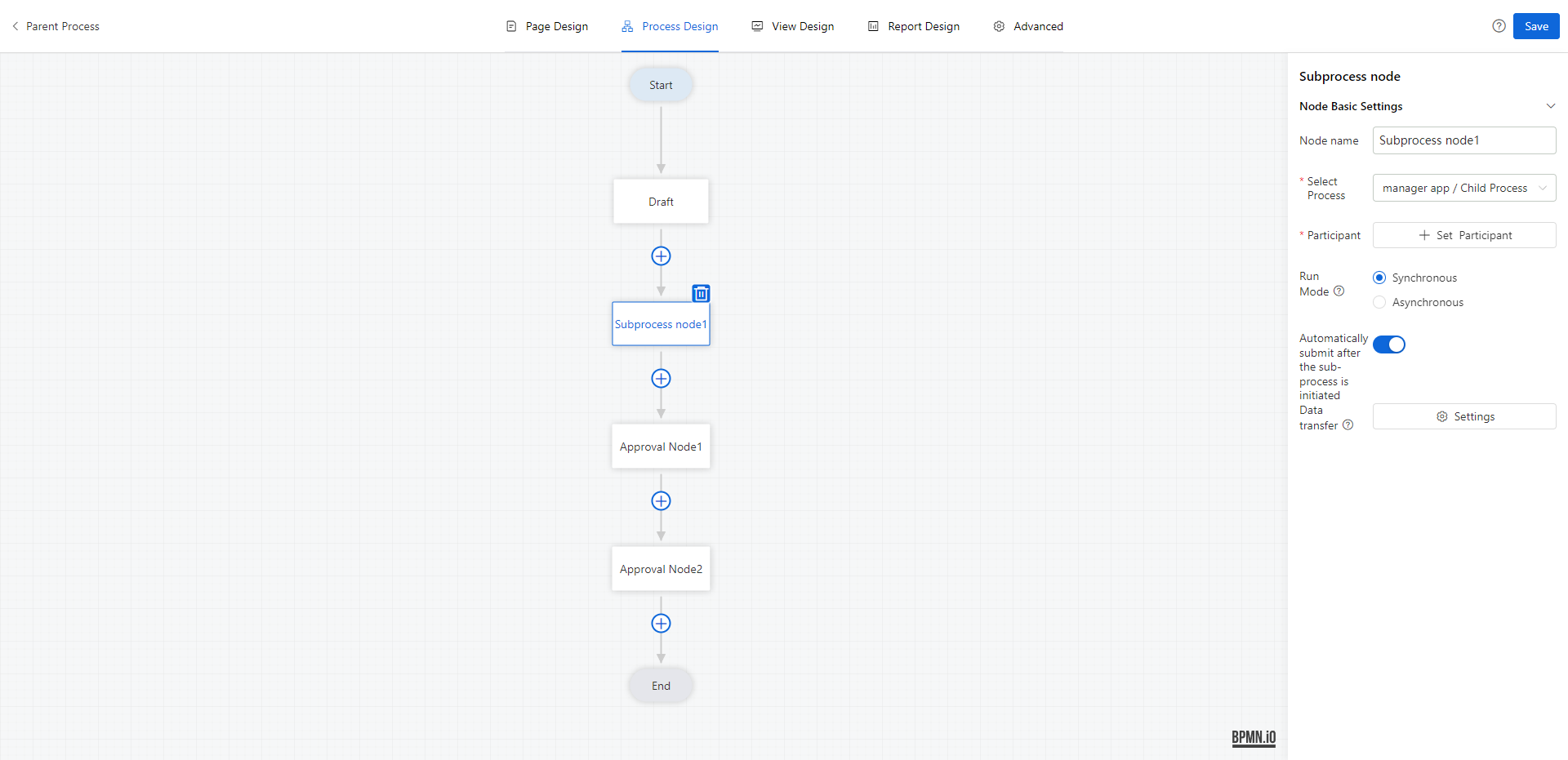
1 Select Process
Select the process within the authority, only one can be selected.
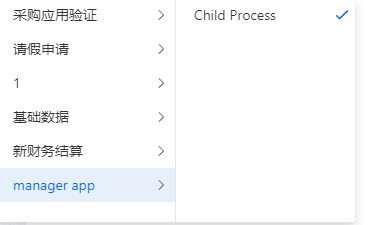
2 Participant
Sub-processes are automatically initiated, you need to select the participant of the sub-process, and the participant acts as the initiator of the process;
The participant can select one or more, and if you select more than one, there will be more than one sub-process running.
3 Run Mode
Set the running relationship between the parent process and the child process;
- Synchronization: enter the next node after the end of the child process; the parent process will continue to flow down only after the end of the child process flow (the end of the child process flow contains the flow status of flow completion and manual end). If there are multiple sub-processes, all sub-processes will end before completion.
- Asynchronous: the child process is initiated to the next node; the flow state of the parent process is not affected by the child process, i.e., after the process flows to the child process, the parent process continues to flow down the line.
The default is synchronous.
4 Automatically submit after the sub-process is initiated
If it is turned on and the sub-process is automatically submitted after it is initiated, the sub-process is automatically created for the Participant, and it is submitted directly to the next node of the order making, and goes to the subsequent approval node.
If it is not enabled, only the sub-process form data is created, and a pending process is created for the Participant to stay in the order node, and the sub-process needs to be submitted manually by the Participant.
5 Data transfer
Sets the data transfer rules between processes when the parent process and the child process are running.
- Parent process →Sub-process: When the parent process flows to the sub-process node, the following parent process field values will be assigned to the corresponding sub-process fields
Sub-process→ parent process: When the sub-process flow is completed, the following sub-process field values will be assigned to the corresponding parent process fields
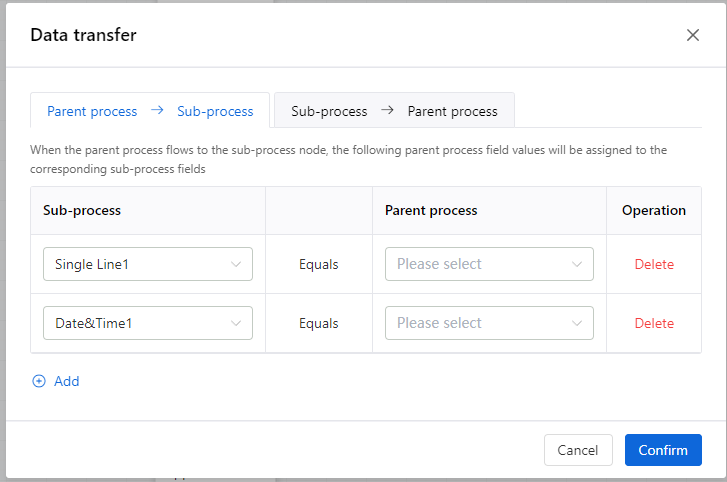
Data transfer rules:
- Support [master-master], [child-child] two kinds of assignment relationship;
- field type filtering the new data of the same data service;
- and can only be assigned by business fields, system fields to business fields;
- each field can only be selected once;
- when assigning values between sub-tables, a sub-table can only be assigned by the same sub-table; e.g., the parent process has sub-tables A and B, and the sub-processes have sub-tables C and D. Sub-tables A can be;
- assigned to the sub-processes' child table C, child table D, but can not assign both child table A, child table B to child table C;
6 Sub-process operation rules
When a sub-process is executed asynchronously, if the last node of the parent process also passes, the status of the parent process becomes “completed” regardless of whether the status of the sub-process is completed or not.
When there are multiple sub-processes, the values will be passed according to the completion time of the sub-processes, and the sub-processes completed first will pass the values first, and the sub-processes completed later will overwrite the previous data.
When the sub-process is executed asynchronously, when the sub-process is completed, if the parent process is completed, it still needs to pass the value, and the order of passing the value is the same as above.
Dismissal rule of approval node in parent process: If “Dismiss to previous approval node” is set, if the previous approval node is on top of the child process node, it will be dismissed to the previous approval node normally and the child process node will be skipped.
Parent process dismissal (child process subsequent nodes dismissed to the node in front of the child process), the impact on the operation of the child process
- synchronized: does not affect the operation of the sub-process;
- asynchronous :
- If the dismissal to the node in front of the sub-process, and the node is submitted and runs normally according to the process, the running sub-process is discarded, and when you go to the node of the sub-process again, the sub-process activates a new process;
- If the dismissal to the node in front of the sub-process and the node is submitted and goes directly to the node that is dismissed, the running sub-process is unaffected and runs normally.
When the parent process run is discarded, the child process data is also nullified. When the parent process run is terminated, the child process is discarded.