
Users mainly design reports in the report designer,specifically, it is: You can choose different types of reports (such as bar charts, line charts), select data source, configure different report graphic styles.
Main interface
The interface layout of the report designer is shown in the following figure, include: [navigation bar], [Chart selection area], [Canvas area], [Attribute Panel].
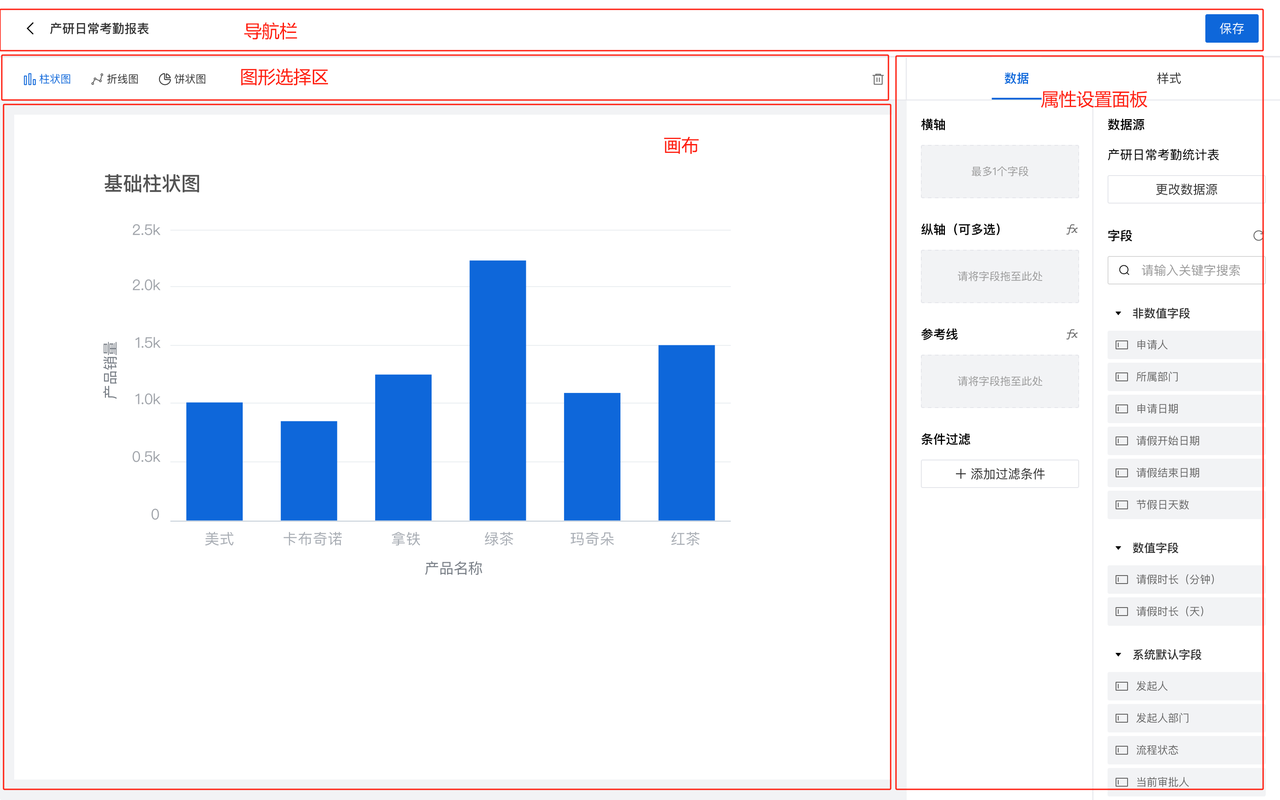
Navigation bar:Here, you can choose the report graphics you need to design the current report. Currently, we provide 5 types of report graphics: bar chart, line chart, pie chart, detail table, and indicator card.
Chart selection area:Real time display of the report display effect designed by you.
Attribute Panel:
- Data source:在这里设置你的报表需要统计的数据来源,可以选择当前应用及关联应用下的表单和当前应用下的数据流;
- 图表参数:如柱状图的横轴和纵轴,从你选择的数据来源中选择字段,纵轴选择一个数值字段,横轴可以选择多个字段;
- 样式:你可以自定义配置报表图表的样式。